Eli : Memcached, MySQL, Highcharts

Tag - php

Tag - php

Friday, February 6 2015

Solve PHP Warning : session_start() [function.session-start]: Node no longer exists
PHP Warning : session_start() [function.session-start]: Node no longer exists

This error is really annoying and can be hard to solve, it appears in two forms and only after a session has already been set.
This error will output two different messages :

PHP Warning:  Unknown: Node no longer exists in Unknown on line 0
PHP Warning : session_start() [function.session-start]: Node no longer exists in {session_start() file} on line 32

Solution is really simple, you have a SimpleXMLElement in your $_SESSION that does not deserialize properly.

Finding what variable trigger the error

PHP only tells you where the error kicks in (the session_start()), not where it really happened. To verify the diagnostic, first find your session.save_path

In PHP

[PHP]echo ini_get('session.save_path')

or simply

print_r($_SESSION)

On your server

php -i | grep session.save_path

Then go to this directory and open a sess_XXX file, then find a string looking like

myVariable|O:16:"SimpleXMLElement":0:{}

In serialized code, it means your variable myVariable is an Object, whose class name is 16 characters long and is SimpleXMLElement, 0:{} means it's empty.

Fixing the error

You need then to add a string cast in your PHP script for this variable when you assign it to the $_SESSION

# Invalid code
$_SESSION[myVariable] = $simpleXML->node->anotherNode->variable
# Correct code
$_SESSION[myVariable] = (string)$simpleXML->node->anotherNode->variable

If you have a more complex SimpleXMLElement (eg : a XML node, not just a string), then use the asXML() method

# Invalid Code
$_SESSION['myVariable'] = $simpleXML->node
# Accessing the variable
$myVariable = $_SESSION['myVariable'];
# Correct Code
$_SESSION[myVariable] = $simpleXML->node->asXML()
# Accessing the variable
$myVariable = new SimpleXMLElement($_SESSION['myVariable']);

Don't forget to change your access to this session variable as it will not be a SimpleXMLElement but rather a string containing XML.
Solve Wrong permissions on configuration file, should not be world writable! error on phpMyAdmin

Introduction

phpMyAdmin want config.inc.php to be not world writable, it's sound simple, but not if you run phpMyAdmin from an NTFS filesystem (in my case, linux server who mount a Windows folder) it's not that simple. There are two way to solve this problem :

Simple way, Linux Server, Linux Filesystem

Just chmod 0755 the file

chmod 0755 config.inc.php


Linux or Windows Server, NTFS Filesystem

If like me you run a Linux Virtual Machine who mount a Windows folder where phpMyAdmin sources are located, edit config.inc.php and add this line :

$cfg['CheckConfigurationPermissions'] = false;

This will tell phpMyAdmin to stop checking for fileperm because they can't be properly detected.

Hope this help

How to regularly check for a newer version in a PHP application

Introduction

I was searching a quick way to inform people that a newer version of phpMemcachedAdmin was released, without needing to visit the website everyday.
I only found scripts that make HTTP request every time, so i wrote this little function to add some internal cache to the HTTP request.

Here is the result : a small script for a PHP application to check for a newer version, using a file hosted on code.google.com (File example here)

What it does

  • It stores a local file named .version where the latest version available is stored (Plain text like "1.2.0")
  • Each time the local file is older than 15 day, it goes to code.google.com to check for the latest version (Again, the file only contains version number "1.2.0")
  • It wrote the latest version available in the local file
  • If the file is younger than 15 day, it open the local file, and compare the version number stored in it with the application current version.

So with this small technique, only one HTTP request is done every 15 day, the rest of the time it's only a local file, being the least intrusive in the user system.

PHP version check script

This script works in both Linux & Windows, use system temp path to wrote the latest version file, and also use the error suppression operator (@), to prevent warning on file_get_contents() function if the user does not have access to code.google.com.

# Actual application version
define('CURRENT_VERSION', '1.2.1');
 
/**
 * Check for the latest version, from local cache or via http
 * Return true if a newer version is available, false otherwise
 *
 * @return boolean
 */
function check()
{
    # Configuration array
    $ini = array('local_path' => sys_get_temp_dir() . DIRECTORY_SEPARATOR . '.version',
                 'distant_path' => 'http://phpmemcacheadmin.googlecode.com/files/latest',
                 'time_between_check' => 15*24*60*60);
 
    # Checking if file was modified for less than $ini['time_between_check'] ago
    if((is_array($stats = @stat($ini['local_path']))) && (isset($stats['mtime'])) 
       && ($stats['mtime'] > (time() - $ini['time_between_check'])))
    {
        # Opening file and checking for latest version
        return (version_compare(CURRENT_VERSION, file_get_contents($ini['local_path'])) == -1);
    }
    else
    {
        # Getting last version from Google Code
        if($latest = @file_get_contents($ini['distant_path']))
        {
            # Saving latest version in file
            file_put_contents($ini['local_path'], $latest);
 
            # Checking for latest version
            return (version_compare(CURRENT_VERSION, $latest) == -1);
        }
        # Can't connect to Google Code
        else
        {
            # In case user does not have access to code.google.com !!!
            # Here it's up to you, you can write nothing in the file to display an alert
            # leave it to check google every time this function is called
            # or write again the file to advance it's modification date for the next HTTP call.
        }
    }
}

Hope this little script will help you well.

Install Hudson/Jenkins on CentOS

Hudson monitors executions of repeated jobs, such as building a software project or jobs run by cron, we can use it as a continuous integration server for PHP Application.

Theses quick steps can be used to install Hudson or Jenkins, simply replace all hudson occurences with jenkins.

Let's see how to install Hudson on a CentOS 5.5 server.

Installing Java, Ant and Tomcat

yum install -y java ant
yum install tomcat5 tomcat5-webapps tomcat5-admin-webapps

Then we need to add Tomcat to our server startup

chkconfig --add tomcat5

Now edit Tomcat configuration file to add Hudson home directory (We will use /data/hudson/)

vi /etc/tomcat5/tomcat5.conf

Add at the bottom of the file

# If you wish to further customize your tomcat environment,
# put your own definitions here
# (i.e. LD_LIBRARY_PATH for some jdbc drivers)
# Just do not forget to export them :)
HUDSON_HOME=/data/hudson/
CATALINA_OPTS="-DHUDSON_HOME=/data/hudson/ -Xmx512m"


Installing Hudson 2.0.0

Go to webapps directory

cd /var/lib/tomcat5/webapps/

Download lastest version of Hudson from http://hudson-ci.org/ or latest from Jenkins from http://jenkins-ci.org/

wget http://java.net/projects/hudson/downloads/download/war/hudson-2.0.0.war
mv hudson-2.0.0.war hudson.war

Now make home folder for hudson and give it Tomcat user right

mkdir /data/hudson
chown tomcat.tomcat /data/hudson/

Restart Tomcat to finalize installation

 /etc/init.d/tomcat5 restart

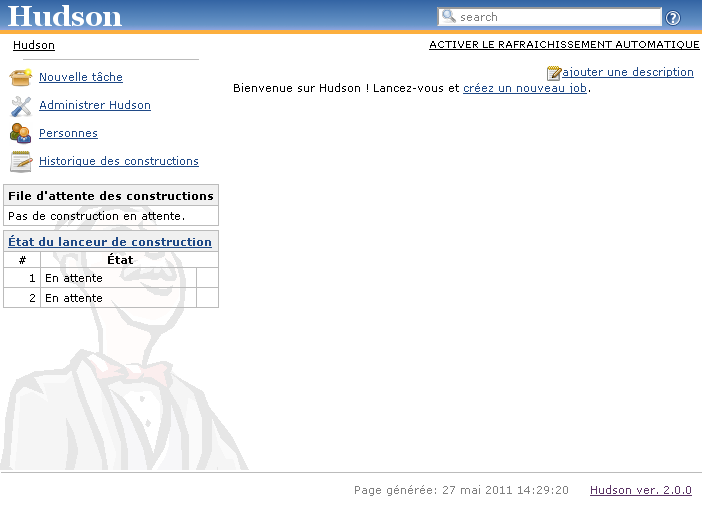
Now check if everything is ok by opening a web browser and access hudson with something like http://yourhost:8080/hudson/

You will see something like this :

Hudson start screen

You can now add your project, if you have a PHP Project, check http://jenkins-php.org/ for an easy template solution.

Disable layout and view renderer in Zend Framework

A quick tip when you need to disable layout and/or view rendering, simply add in your controller

public function preDispatch()
{
    $this->_helper->layout()->disableLayout();
    $this->_helper->viewRenderer->setNoRender(true);
}

Hope that can save you some time trying to find how in the documentation.

- page 1 of 3