Eli : Memcached, MySQL, Highcharts

Tag - memcached - Tag - memcached - Eli : Memcached

Tag - memcached - Tag - memcached - Eli : Memcached

What's new with Memcached

I post on this blog an interesting mail posted on Memcached Mailing List (http://groups.google.com/group/memcached) by Trond Norbye, check the original message here


Introduction

We've done a lot of work since the latest 1.4.x release, but most of it has been invisible to most users. To catch up those who haven't been actively watching development, we're going to ease you into how it affects different segments of users, starting with general cache users.

We don't expect much to have changed from the perspective of the typical memcached user. The purpose of most of the work is to turn memcached into an extensible platform on top of which users can experiment with new storage mechanisms, extending with new commands, changing logging, adding instrumentation, etc...
This is mostly a reaction to mailing lists posts where someone wants to do something that someone else doesn't want done. We've gone out of our way to ensure that both can have what they want (and nobody has to fork).

Major Points

The biggest change is that the code is no longer one blob, but instead a set of modules the user may enable based upon their preference. This enables others to create their own backing store, and still use the same command parser and core protocol handling as everyone else.

Another change users may like is that the logging mechanism is another module, so that you can get all of the output to syslog (or windows event log if you like). We now have official support for Microsoft Windows !
We're compiling the source on Microsoft Windows every day, so we find and fix bugs there at the same time as we do on the UNIX versions. The automatic testing isn't as good as what we've got on UNIX, but believe me: we're working on it!

Part of the point of going to modular components means that they are easier to test in a test program without having to "fork()" and test everything "over the wire". We have tests that cover specific internals that can run very quickly.

New stats

There are a number of new stats introduced in the next release. The key supplied in the status command is passed to the storage engine to allow the storage engine to add extra information to the existing stats commands, and to create their own stat commands.

Stats returned by the default stats command

libevent

Over the time we've seen a lot of bugs around people using an old version of libevent. That's part of the reason why we bundle a well known version of libevent in the release distribution. Memcached checks the libevent version during startup, and will refuse to start if the one used is too old. Since most operating systems use shared libraries these days, you might be using another version than the one you originally used when you first built memcached. In order for us to see which library people are using we decided to put it into the stats as well.

rejected_conns

The number of times a connection attempt was refused (due when we're hitting the maximum number of connections).

topkeys

You may get information about the most popular keys in memcached by exporting the environment variable MEMCACHED_TOP_KEYS to the number of keys you would want memcached to keep track of.
There is no such thing as a free lunch, so enabling this will have an impact on memory and speed. We've decided to _disable_ this by default for now, So you need to export this variable to enable the feature.

me@localhost:> MEMCACHED_TOP_KEYS=10 ./memcached

Running "stats topkeys" would return something like (I've added the line breaks and indentations to make it more readable in this document):

STAT my-key2 get_hits=0,get_misses=1,cmd_set=0,incr_hits=0,
     incr_misses=0,decr_hits=0,decr_misses=0,delete_hits=0,
     delete_misses=0,evictions=0,cas_hits=0,cas_badval=0,
     cas_misses=0,ctime=2,atime=2
STAT my-key1 get_hits=1,get_misses=0,cmd_set=1,incr_hits=0,
     incr_misses=0,decr_hits=0,decr_misses=0,delete_hits=0,
     delete_misses=0,evictions=0,cas_hits=0,cas_badval=0,
     cas_misses=0,ctime=12,atime=12

We hope to characterize the impact of this new stat before the final release and would like to include your feedback.

Stats returned by aggregate

The combination of the storage engine interface and the SASL auth allows for the combination of a connection-based stats. The aggregate subcommand is used to aggregate the stats from all of the connections on the server. The stats returned from the aggregate subcommand is the same as the normal stats command.

Stats returned by stats settings

extension

Displays one of the extensions loaded (may appear multiple times).

STAT logger syslog
STAT ascii_extension scrub
STAT ascii_extension noop
STAT ascii_extension echo

topkeys

The number of keys we are monitoring.

For part 2 of "What's new in Memcached", check this post, more informations about Virtual buckets, new commands and modularity in it.
Memcached stats reset command

Stats reset is another undocumented feature (see this article for stats cachedump command) of Memcached

stats reset command

Telnet command : stats reset \r\n

This function will reset following stats :

  • total_connections
  • get, set, flush, cas, incr and decr stats
  • auth_cmds and auth_errors
  • bytes_read and bytes_written
  • total_items will be reset but not curr_items
  • evictions and reclaimed


stats reset command example

First we get the current stats :

stats
stats
STAT pid 16963
STAT uptime 13759537
STAT time 1288017338
STAT version 1.4.5
STAT pointer_size 64
STAT rusage_user 35326.604539
STAT rusage_system 83474.312975
STAT curr_connections 443
STAT total_connections 7062593
STAT connection_structures 708
STAT cmd_get 6994013410
STAT cmd_set 285664007
STAT cmd_flush 11
STAT get_hits 6709348930
STAT get_misses 284664480
STAT delete_misses 133333
STAT delete_hits 641874
STAT incr_misses 0
[...]
STAT auth_errors 0
STAT bytes_read 1078950472291
STAT bytes_written 2380539854758
STAT limit_maxbytes 1610612736
[...]
STAT conn_yields 0
STAT bytes 1019869479
STAT curr_items 1019724
STAT total_items 285630709
STAT evictions 187149
STAT reclaimed 4867645
END

Now we reset Memcached server stats

stats reset
RESET

The final result :

stats
STAT pid 16963
STAT uptime 13759736
STAT time 1288017537
STAT version 1.4.5
STAT pointer_size 64
STAT rusage_user 35327.040473
STAT rusage_system 83475.259831
STAT curr_connections 456
STAT total_connections 2
STAT connection_structures 708
STAT cmd_get 2117
STAT cmd_set 101
STAT cmd_flush 0
STAT get_hits 2018
STAT get_misses 99
STAT delete_misses 0
STAT delete_hits 0
STAT incr_misses 0
[...]
STAT auth_errors 0
STAT bytes_read 154416
STAT bytes_written 689536
STAT limit_maxbytes 1610612736
[...]
STAT conn_yields 0
STAT bytes 1019306738
STAT curr_items 1019534
STAT total_items 101
STAT evictions 0
STAT reclaimed 0

Be aware that using this function can hide you a lot of things, i find it only useful when we put a new version of cache management to reset all stats and start monitoring the new version without the stats history.

Other Memcached Resources

You can find a lot of Memcached resources on this Memcached resources page.

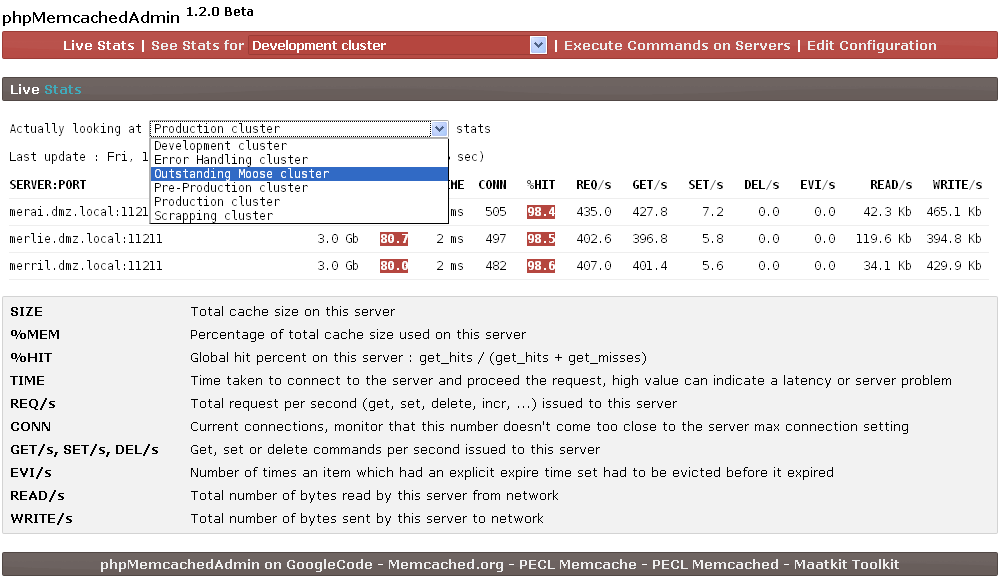
phpMemcachedAdmin 1.2.0 beta released

New version of memcached monitoring administration is released and available from http://code.google.com/p/phpmemcacheadmin/

A lot of things have been improved in this version :

  • Look & feel
  • Multiple cluster support
  • Search for a key in Memcached for a key & Telnet command options
  • And many more ...

Check the complete release notes here : http://code.google.com/p/phpmemcacheadmin/wiki/Roadmap

phpmemcachedadmin-1.2.0beta_livestats.png

If you have any suggestion or bug, you can contact me by mail

Other Memcached Resources

You can find a lot of Memcached resources on this Memcached resources page.

Friday, December 24 2010

Understanding Memcached stats cachedump command

This is an undocumented feature, meaning this command is not supported by the Memcached team, it still exists in 1.4.5 but can possibly be removed in any version.

stats cachedump command

Telnet command : stats cachedump <slabs_id> <limit>\r\n

Parameters :

  • <slabs_id> : slab id from where you want to retreive the keys
  • <limit> : result limit, 0 mean no limit

Be aware that this function return is limited to 1MB (or maybe 2MB, this is not clear actually)

Example :

stats cachedump 4 0
ITEM key_7abc8b445c35d211046a856f946dde96a8b48bf8 [172 b; 1293184017 s]
ITEM key_da39a3ee5e6b4b0d3255bfef95601890afd80709 [173 b; 1293183894 s]
ITEM key_b858a87c07b04c4568f51b0dce655f78d73c02b3 [178 b; 1289314215 s]
ITEM key_eadcd9bd2a09c75aef04954e6799e50278ee124a [173 b; 1293186833 s]
ITEM key_fa3a0c6f483fb9e1cf9b5d7e4aa224c541dcf618 [167 b; 1289314215 s]
END


stats cachedump command return

It return items with the template
ITEM <item_key> [<item_size> b; <expiration_timestamp> s]

Parameters :

  • <item_key> : The item key
  • <item_size> : Item size (including key) in bytes
  • <expiration_timestamp> : Expiration timestamp in second

To understand the timestamp, we need to make a stats command on the server

stats
stats
STAT pid 1879
STAT uptime 4222347
STAT time 1293536562
STAT version 1.4.5
[...]

If the timestamp is equal to stats(time - uptime) then the item have got an infinite expiration else the item will expire when the timestamp is reached.

In our example, 1293536562 - 4222347 = 1289314215, two items have an infinite expiration

Other Memcached Resources

You can find a lot of Memcached resources on this Memcached resources page.

Friday, October 15 2010

Various versions of Memcached for Windows

This post contains various binaries versions of Memcached for Windows as finding some of them may be difficult.

Memcached 1.2.X

Memcached 1.2.4 for Windows (32 Bits) : memcached 1.2.4 win32.zip

Memcached 1.2.5 for Windows (32 Bits) : memcached 1.2.5 win32.zip

Memcached 1.2.6 for Windows (32 Bits) : memcached 1.2.6 win32.zip

Memcached 1.4.X

Memcached 1.4.2 for Windows (32 Bits) : memcached 1.4.2 win32.zip

Memcached 1.4.4 for Windows (32 Bits) : memcached 1.4.4 win32.rar

Memcached 1.4.5 for Windows (32 Bits) : memcached 1.4.5 win32.zip

Memcached 1.4.5 for Windows (64 Bits) : memcached 1.4.5 win64.zip

Credits

All credits goes to Jellycan for 1.2.5 and 1.2.6 and Northscale (now Membase) for 1.4.X.

Other Memcached Resources

You can find a lot of Memcached resources on this Memcached resources page.

- page 2 of 4 -