
Eli : Memcached, MySQL, Highcharts

Memcached - Memcached - Eli : Memcached

Memcached - Memcached - Eli : Memcached

memcached-logo.jpg

Free & open source, high-performance, distributed memory object caching system

Memcached server profiling with mk-query-digest
Introduction

Monitoring Memcached through hit rate, evicitions sometime is not enough to find what is really happening.
Maatkit have released a Perl toolkit for MySQL and PosteGreSQL, but one tool on this toolkit can also profile Memcached traffic.
This article will focus on mk-query-digest, the Memcached traffic profiler.

Dumping tcp traffic with tcpdump

Before running tcpdump, be aware that it take ~35% load of a one vCPU server here and the output file increase in size at a rate of 300 MB / min, but this may vary, depending on your cached data and requests rate.

You can also tcpdump directly from cache server to get all requests issued to this server, or from an Apache server (In case you only get memcached request asked by this particular server).

Installation

To start profiling we first have to capture memcached network traffic with tcpdump, in case you don't have it installed, you can grab it from www.tcpdump.org or using your system installation prefered method.

Using tcpdump

To start the tcpdump, use the command below :

/usr/sbin/tcpdump -s 65535 -x -n -q -tttt -i eth0 port 11211 > /tmp/tcpdump.log

For more information about tcpdump filters, take a look at this documentation
Server will respond if everything is fine :

tcpdump: verbose output suppressed, use -v or -vv for full protocol decode
listening on eth0, link-type EN10MB (Ethernet), capture size 65535 bytes*

To stop tcpdump, hit CTRL + C, result will show like this :

599513 packets captured
607766 packets received by filter
8244 packets dropped by kernel

And were done with the tcpdump. Let's profile !

Memcached profiling

Although mk-query-digest is designed to be as efficient as possible, it can use a lot of CPU and memory, so I prefer to move log output on our log analysis server. After log file is moved, we can install mk-query-digest.

Download the latest release of mk-query-digest

Simply execute

wget http://www.maatkit.org/get/mk-query-digest

or

wget  http://maatkit.googlecode.com/svn/trunk/mk-query-digest/mk-query-digest

We also need to enable execution of this perl script

chmod 0777 mk-query-digest


Profiling with mk-query-digest

Then we can start profiling with the help of http://www.maatkit.org/doc/mk-query-digest.html

During profiling, mk-query-digest will inform us that it is always running (A nice addition of a recent release)

dump_merlie.log:  28% 01:14 remain
dump_merlie.log:  57% 00:45 remain
dump_merlie.log:  85% 00:14 remain

Note that if you CTRL + C before the end, mk-query-digest will also put display the results of data he has already computed

Results by Memcached server response code

First command is to show all memcached response code from tcpdump

./mk-query-digest --type memcached --group-by res --limit 10 /tmp/tcpdump.log

After some time result will be displayed.
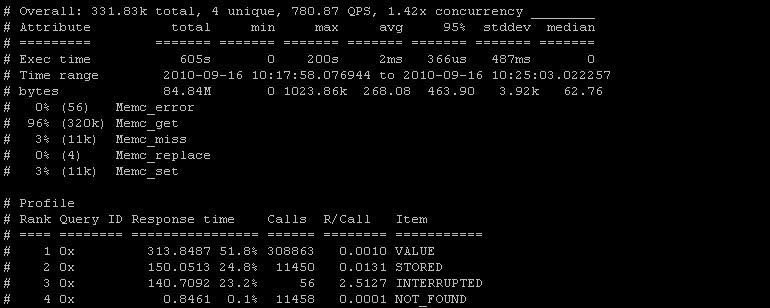
mk-query-digest_global.png

What it tell us :

General & time stats

mk-query-digest_global_overall.png
First line show us that during 331.83k memcached queries, there was 4 unique results for the --group-by res (VALUE, INTERRUPTED, NOT_FOUND, STORED), and that during the time interval it was issued 780.87 query per second with a 1.42x concurrency.
Lines below show us time taken to respond to theses commands (min, max, avg, 95%, ...)

Commands, miss & errors

mk-query-digest_global_commands.png

Finally, we see what commands were issued to memcached, and what errors takes place (that is why % sum are above 100%) but we have to distingish two set of datas :

Memc_get tell us logically that 96% of 331K commands where get, 3% were set commands, and 4 commands where replace, this finally lead us to 100%
Memc_miss is for any command that result in a NOT_FOUND, in this case, 3% of all command tried to access to a nonexistent key.
Memc_error refers to retrieval (gets) commands that were INTERRUPTED, 56 of the 308K gets were in this case.

Memcached results

mk-query-digest_global_results.png
The columns should be fairly self-explanatory: rank, query ID (Not in use here), response time sum and percentage of total, number of calls and response time per call, and results (asked by our --group-by res)

First observation

As we can deduce from above screen, it seems that this server have a pretty good hit ratio (Only 3% miss) and every NOT_FOUND seems to be followed by a STORED (A miss in a get command followed by a set), and everything is fast. But we found 56 INTERRUPTED (0.0001%) that takes alone 24.8% of the time taken to execute 270K commands. Next we have to find what is wrong with these 0.0001% of total command that goes INTERRUPTED.

Following results : VALUE result

After this summary, every result is detailed, first the VALUE result
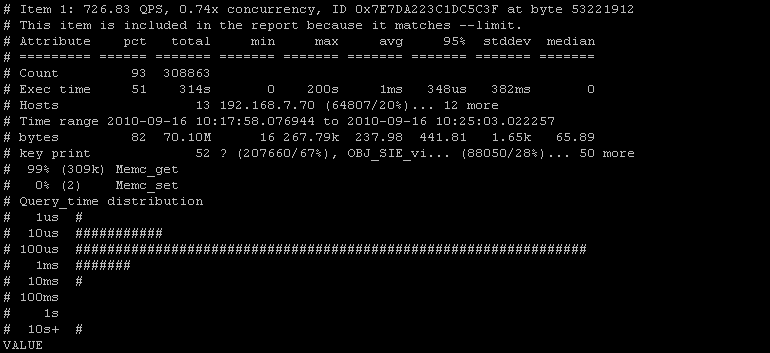
mk-query-digest_value_global.png

Let's see what each part say :

General & time stats
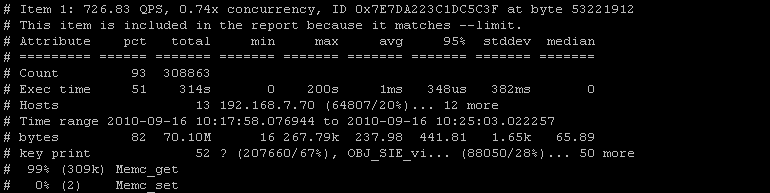
mk-query-digest_value_overall.png
This part is similar to the general time & stats screen, you've got here time stats (total, max, avg, 95%, ...), hosts that asked for values with percent repartition, size of return values (total, max, avg, ...), and distribution of commands (I think the two set commands is a misread by mk-query-digest)

Query time distribution

mk-query-digest_value_query_time.png
This is particulary interesting logarithmic chart of time clustering, it show distribution of time of requests execution. As we see, most of them are under 100us, and a small part of them are a bit slow.
You have to check this charts, high response time must be avoid.

Looking a overall stats, it seem one request take 200s to execute, it can be a lot of things, client closing connection, network problem, in my case, 314s total - 200s max = 114 s to execute and send 308K get request seem to be pretty good, i will not investigate this more, but will watch it regulary. I will make another profiling to see what's happening after explaining INTERRUPTED.

INTERRUPTED
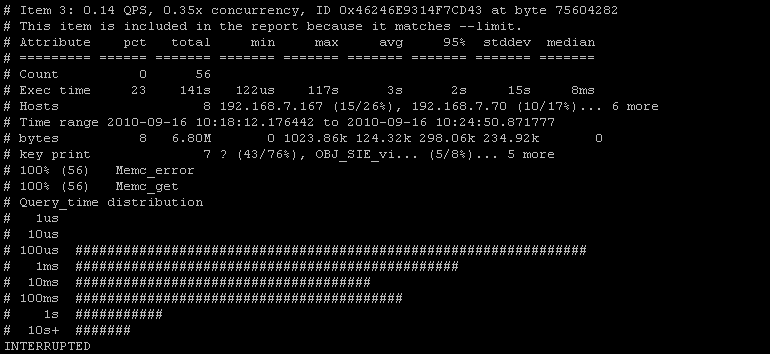
mk-query-digest_interrupted_global.png
Time chart show that INTERRUPTED requests take lot of time, that one object is 1023.86kBytes (limit is 1024), but key print can't show us if one particular key is the cause.
So we have to change our mk-query-digest parameters to investigate further

Memcached result INTERRUPTED, grouped by keys

What I want is to see what key retreival were interrupted, to see if a particular key is broken or something similar.

Building the mk-query-digest query

Mk-query-digest support PERL regular expressions and give acces to EventAttributes (see this documentation).
Do not hesistate to test your own commands, if something is wrong, mk-query-digest will tell it when you launch it.
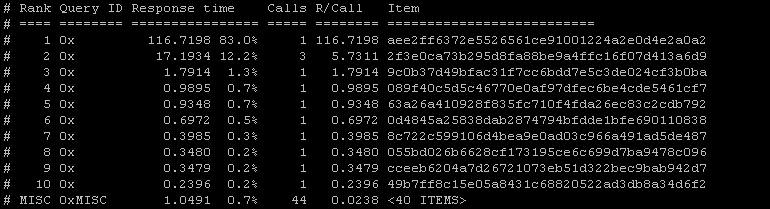
So with some tweak, we now have a request that will ask to only show INTERRUPTED events grouped by key to find what iis messed up.

./mk-query-digest --type memcached --group-by key  --limit 10 --filter 
                  '($event->{res}) =~ m/INTERRUPTED/' /tmp/tcpdump.log


Result
mk-query-digest_interrupted_bykey.png
We now see that one particular key take 116 sec, the others are bellow 1 sec.
By using phpMemcachedAdmin, to make a get request with theses key, nothing seemed wrong, values were returned very quickly, so my first clue about connection closed seems right.

Another thing i note is that using hash for memcached key is a good idea, but our developers need to put some ID before, like projectA_aee2ff ...., because looking a theses key, i can't see what it refers to.

Looking for big return values

We can also look for response time of big values, or find values that will go beyond the 1MBytes Memcached limit.

./mk-query-digest --type memcached --group-by fingerprint  --limit 10 --filter
                  '($event->{bytes}) >= 1_000_000'  /tmp/tcpdump.log
Results

I only get one result for this particular request mk-query-digest_bigvalues.png
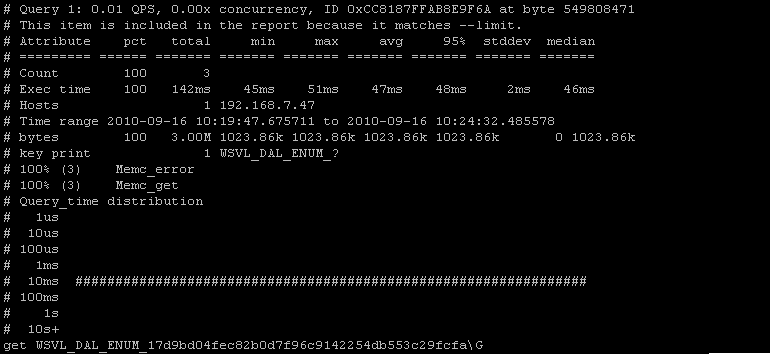
This key is exactly at the Memcached maximum object size, and must be watched and/or reduced in size.

Useful Options

--save-results
Save results to the specified file.

--timeline
Show a timeline of events.

./mk-query-digest --type memcached --timeline --group-by res /tmp/tcpdump.log

mk-query-digest_timeline.png

--watch-server
This option tells mk-query-digest which server IP address and port (like "10.0.0.1:3306") to watch when parsing tcpdump

Resources

Tcpdump homepage : www.tcpdump.org
Tcpdump filters explanation : http://www.cs.ucr.edu/~marios/ethereal-tcpdump.pdf
Maatkit homepage : http://www.maatkit.org/
Mk-query-digest homepage : http://www.maatkit.org/doc/mk-query-digest.html

Other Memcached Resources

You can find a lot of Memcached resources on this Memcached resources page.


Memcached 1.4.8 Released

Release notes from official site :

Overview

Feature and bugfix release. New Touch commands, counters, and a change to connection limit functionality. Included is an important bugfix for binary protocol users. The binary get command was not activating the LRU algorithm. Fetching an item would not prevent it from getting expired early.

Fixes

  • Fix to write correct pid from start-memcached
  • Fix to enable LRU when using binary protocol
  • Upgrade stats items counters to 64bit
  • Add new stats expired_unfetched, evicted_unfetched
  • Allow setting initial size of the hash table
  • Expose stats for the internal hash table
  • Issue 220 : incr would sometimes return the previous item's CAS
  • Fixed bug on multi get processing
  • Experimental maxconns_fast option
  • Add an ASCII touch command
  • Add binary GATK/GATKQ
  • Backport binary TOUCH/GAT/GATQ commands
  • Issue 221 : Increment treats leading spaces as 0
  • Fix compile error on OS X


New Features

Touch Commands

Binary Touch/GAT commands were backported from 1.6. New GATK/GATKQ commands were added for completeness. Finally, an Ascii protocol touch command was also added.

Touch commands are used to update the expiration time of an existing item without fetching it. Say you have a counter set to expire in five minutes, but you may want to push back the expiration time by five more minutes, or change it to 15 minutes. With touch, you can do that.

The binary protocol also adds GAT commands (Get And Touch), which allow you to fetch an item and simultaneously update its expiration time.

Fast Connection Limit Handling

A new option, -o, has appeared! With -o new, experimental, or highly specific options are given full names. The first of which is maxconns_fast

$ memcached -o maxconns_fast

This option changes the way the maximum connection limit is handled. By default, when memcached runs out of file descriptors, it stops listening for new connections. When this happens, connections will sit in the listen backlog (defaulting to 1024, and adjustable with the -b option). Once some connections close off, memcached will starts accepting new connections again and they will be served.

This is undesireable as it can cause clients to delay or timeout for a long period of time. Long enough that it may be quicker to treat the items as a cache miss.

When a client connects and memcached is configured with maxconns_fast, it writes an error to the client and immediately closes the connection. This is similar to how MySQL operates, whereas the default is similar to Apache.

It is experimental as it is unknown how clients will handle this change. Please help test and report any issues to upstream client maintainers!

Internal Hash Table

STAT hash_power_level 16
STAT hash_bytes 524288
STAT hash_is_expanding 0

Now it's possible to see how much memory the hash table itself uses. This can be useful for deciding on RAM limits for very large instances.

There is also a new option for setting the size of the hash table on startup:

$ memcached -o hashpower=20

If you run instances with many millions of items, and items are added very rapidly on a restart, it may be desireable to presize the hash table. Normally memcached will dynamically grow the hash table as needed, and this operation is generally very low overhead. If you put decals on your '96 Mazda grapefruit shootermobile, you may like this option.

Just examine the hash_power_level before restarting your instances, and adjust the startup command.

expired_unfetched, evicted_unfetched

The two stats represent items which expired and memory was reused, and valid items which were evicted, but never touched by get/incr/append/etc operations in the meantime. Useful for seeing how many wasted items are being set and then rolling out through the bottom of the LRU's.

If these counters are high, you may consider auditing what is being put into the cache.

You can download it from : http://memcached.googlecode.com/files/memcached-1.4.8.tar.gz


Memcached 1.4.7 Released

Release notes from official site :

Overview

This is a maintenance release with many small bugfixes. Now (mostly) immune from time travelers.

Fixes

  • Use a monotonically increasing timer
  • Immediately expire items when given a negative expiration time
  • Fix memcached-tool to print about all slabs
  • Properly daemonize memcached for debian
  • Don't permanently close UDP listeners on error
  • Allow memcached-init to start multiple instances (not recommended)
  • Issue 214 : Search for network libraries before searching for libevent
  • Issue 213 : Search for clock_gettime in librt
  • Issue 115 : accont for CAS in item_size_ok
  • Fix incredibly slim race for maxconns handler. Should no longer hang ever
  • Issue 183 - Reclaim items dead by flush_all
  • Issue 200 : Don't fire dtrace probe as the last thing in a function


New Features

Montonic Clock This isn't really a feature, but is the main change. If your system has clock_gettime with CLOCK_MONOTONIC support, memcached will attempt to use it. If your clock does wild adjustments, memcached will do its best to continue to count forward and not backward.

However, if you use the "expiration is an absolute time" feature, where specifying an value expiration time as a specific date, it can still break. You must ensure that memcached is started after your clocks have been synchronized. This has always been the case, though.

You can download it from : http://memcached.googlecode.com/files/memcached-1.4.7.tar.gz


What's new with Memcached

I post on this blog an interesting mail posted on Memcached Mailing List (http://groups.google.com/group/memcached) by Trond Norbye, check the original message here


Introduction

We've done a lot of work since the latest 1.4.x release, but most of it has been invisible to most users. To catch up those who haven't been actively watching development, we're going to ease you into how it affects different segments of users, starting with general cache users.

We don't expect much to have changed from the perspective of the typical memcached user. The purpose of most of the work is to turn memcached into an extensible platform on top of which users can experiment with new storage mechanisms, extending with new commands, changing logging, adding instrumentation, etc...
This is mostly a reaction to mailing lists posts where someone wants to do something that someone else doesn't want done. We've gone out of our way to ensure that both can have what they want (and nobody has to fork).

Major Points

The biggest change is that the code is no longer one blob, but instead a set of modules the user may enable based upon their preference. This enables others to create their own backing store, and still use the same command parser and core protocol handling as everyone else.

Another change users may like is that the logging mechanism is another module, so that you can get all of the output to syslog (or windows event log if you like). We now have official support for Microsoft Windows !
We're compiling the source on Microsoft Windows every day, so we find and fix bugs there at the same time as we do on the UNIX versions. The automatic testing isn't as good as what we've got on UNIX, but believe me: we're working on it!

Part of the point of going to modular components means that they are easier to test in a test program without having to "fork()" and test everything "over the wire". We have tests that cover specific internals that can run very quickly.

New stats

There are a number of new stats introduced in the next release. The key supplied in the status command is passed to the storage engine to allow the storage engine to add extra information to the existing stats commands, and to create their own stat commands.

Stats returned by the default stats command

libevent

Over the time we've seen a lot of bugs around people using an old version of libevent. That's part of the reason why we bundle a well known version of libevent in the release distribution. Memcached checks the libevent version during startup, and will refuse to start if the one used is too old. Since most operating systems use shared libraries these days, you might be using another version than the one you originally used when you first built memcached. In order for us to see which library people are using we decided to put it into the stats as well.

rejected_conns

The number of times a connection attempt was refused (due when we're hitting the maximum number of connections).

topkeys

You may get information about the most popular keys in memcached by exporting the environment variable MEMCACHED_TOP_KEYS to the number of keys you would want memcached to keep track of.
There is no such thing as a free lunch, so enabling this will have an impact on memory and speed. We've decided to _disable_ this by default for now, So you need to export this variable to enable the feature.

me@localhost:> MEMCACHED_TOP_KEYS=10 ./memcached

Running "stats topkeys" would return something like (I've added the line breaks and indentations to make it more readable in this document):

STAT my-key2 get_hits=0,get_misses=1,cmd_set=0,incr_hits=0,
     incr_misses=0,decr_hits=0,decr_misses=0,delete_hits=0,
     delete_misses=0,evictions=0,cas_hits=0,cas_badval=0,
     cas_misses=0,ctime=2,atime=2
STAT my-key1 get_hits=1,get_misses=0,cmd_set=1,incr_hits=0,
     incr_misses=0,decr_hits=0,decr_misses=0,delete_hits=0,
     delete_misses=0,evictions=0,cas_hits=0,cas_badval=0,
     cas_misses=0,ctime=12,atime=12

We hope to characterize the impact of this new stat before the final release and would like to include your feedback.

Stats returned by aggregate

The combination of the storage engine interface and the SASL auth allows for the combination of a connection-based stats. The aggregate subcommand is used to aggregate the stats from all of the connections on the server. The stats returned from the aggregate subcommand is the same as the normal stats command.

Stats returned by stats settings

extension

Displays one of the extensions loaded (may appear multiple times).

STAT logger syslog
STAT ascii_extension scrub
STAT ascii_extension noop
STAT ascii_extension echo

topkeys

The number of keys we are monitoring.

For part 2 of "What's new in Memcached", check this post, more informations about Virtual buckets, new commands and modularity in it.


Memcached stats reset command

Stats reset is another undocumented feature (see this article for stats cachedump command) of Memcached

stats reset command

Telnet command : stats reset \r\n

This function will reset following stats :

  • total_connections
  • get, set, flush, cas, incr and decr stats
  • auth_cmds and auth_errors
  • bytes_read and bytes_written
  • total_items will be reset but not curr_items
  • evictions and reclaimed


stats reset command example

First we get the current stats :

stats
stats
STAT pid 16963
STAT uptime 13759537
STAT time 1288017338
STAT version 1.4.5
STAT pointer_size 64
STAT rusage_user 35326.604539
STAT rusage_system 83474.312975
STAT curr_connections 443
STAT total_connections 7062593
STAT connection_structures 708
STAT cmd_get 6994013410
STAT cmd_set 285664007
STAT cmd_flush 11
STAT get_hits 6709348930
STAT get_misses 284664480
STAT delete_misses 133333
STAT delete_hits 641874
STAT incr_misses 0
[...]
STAT auth_errors 0
STAT bytes_read 1078950472291
STAT bytes_written 2380539854758
STAT limit_maxbytes 1610612736
[...]
STAT conn_yields 0
STAT bytes 1019869479
STAT curr_items 1019724
STAT total_items 285630709
STAT evictions 187149
STAT reclaimed 4867645
END

Now we reset Memcached server stats

stats reset
RESET

The final result :

stats
STAT pid 16963
STAT uptime 13759736
STAT time 1288017537
STAT version 1.4.5
STAT pointer_size 64
STAT rusage_user 35327.040473
STAT rusage_system 83475.259831
STAT curr_connections 456
STAT total_connections 2
STAT connection_structures 708
STAT cmd_get 2117
STAT cmd_set 101
STAT cmd_flush 0
STAT get_hits 2018
STAT get_misses 99
STAT delete_misses 0
STAT delete_hits 0
STAT incr_misses 0
[...]
STAT auth_errors 0
STAT bytes_read 154416
STAT bytes_written 689536
STAT limit_maxbytes 1610612736
[...]
STAT conn_yields 0
STAT bytes 1019306738
STAT curr_items 1019534
STAT total_items 101
STAT evictions 0
STAT reclaimed 0

Be aware that using this function can hide you a lot of things, i find it only useful when we put a new version of cache management to reset all stats and start monitoring the new version without the stats history.

Other Memcached Resources

You can find a lot of Memcached resources on this Memcached resources page.


- page 2 of 5 -