Eli : Memcached, MySQL, Highcharts

phpMemcachedAdmin 1.2.0 beta - Eli : Memcached, MySQL, Highcharts

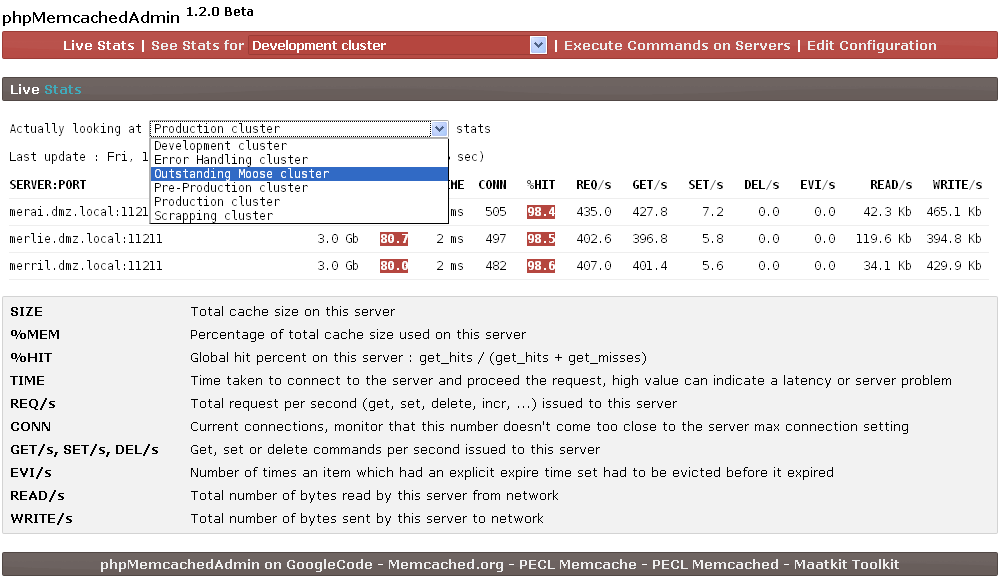
phpMemcachedAdmin 1.2.0 beta released

New version of memcached monitoring administration is released and available from http://code.google.com/p/phpmemcacheadmin/

A lot of things have been improved in this version :

  • Look & feel
  • Multiple cluster support
  • Search for a key in Memcached for a key & Telnet command options
  • And many more ...

Check the complete release notes here : http://code.google.com/p/phpmemcacheadmin/wiki/Roadmap

phpmemcachedadmin-1.2.0beta_livestats.png

If you have any suggestion or bug, you can contact me by mail

Other Memcached Resources

You can find a lot of Memcached resources on this Memcached resources page.


Friday, December 24 2010

Understanding Memcached stats cachedump command

This is an undocumented feature, meaning this command is not supported by the Memcached team, it still exists in 1.4.5 but can possibly be removed in any version.

stats cachedump command

Telnet command : stats cachedump <slabs_id> <limit>\r\n

Parameters :

  • <slabs_id> : slab id from where you want to retreive the keys
  • <limit> : result limit, 0 mean no limit

Be aware that this function return is limited to 1MB (or maybe 2MB, this is not clear actually)

Example :

stats cachedump 4 0
ITEM key_7abc8b445c35d211046a856f946dde96a8b48bf8 [172 b; 1293184017 s]
ITEM key_da39a3ee5e6b4b0d3255bfef95601890afd80709 [173 b; 1293183894 s]
ITEM key_b858a87c07b04c4568f51b0dce655f78d73c02b3 [178 b; 1289314215 s]
ITEM key_eadcd9bd2a09c75aef04954e6799e50278ee124a [173 b; 1293186833 s]
ITEM key_fa3a0c6f483fb9e1cf9b5d7e4aa224c541dcf618 [167 b; 1289314215 s]
END


stats cachedump command return

It return items with the template
ITEM <item_key> [<item_size> b; <expiration_timestamp> s]

Parameters :

  • <item_key> : The item key
  • <item_size> : Item size (including key) in bytes
  • <expiration_timestamp> : Expiration timestamp in second

To understand the timestamp, we need to make a stats command on the server

stats
stats
STAT pid 1879
STAT uptime 4222347
STAT time 1293536562
STAT version 1.4.5
[...]

If the timestamp is equal to stats(time - uptime) then the item have got an infinite expiration else the item will expire when the timestamp is reached.

In our example, 1293536562 - 4222347 = 1289314215, two items have an infinite expiration

Other Memcached Resources

You can find a lot of Memcached resources on this Memcached resources page.


Various versions of Memcached for Windows

This post contains various binaries versions of Memcached for Windows as finding some of them may be difficult.

Memcached 1.2.X

Memcached 1.2.4 for Windows (32 Bits) : memcached 1.2.4 win32.zip

Memcached 1.2.5 for Windows (32 Bits) : memcached 1.2.5 win32.zip

Memcached 1.2.6 for Windows (32 Bits) : memcached 1.2.6 win32.zip

Memcached 1.4.X

Memcached 1.4.2 for Windows (32 Bits) : memcached 1.4.2 win32.zip

Memcached 1.4.4 for Windows (32 Bits) : memcached 1.4.4 win32.rar

Memcached 1.4.5 for Windows (32 Bits) : memcached 1.4.5 win32.zip

Memcached 1.4.5 for Windows (64 Bits) : memcached 1.4.5 win64.zip

Credits

All credits goes to Jellycan for 1.2.5 and 1.2.6 and Northscale (now Membase) for 1.4.X.

Other Memcached Resources

You can find a lot of Memcached resources on this Memcached resources page.


Thursday, October 14 2010

Write file manipulation cross-platform PHP code

As we use Windows computers to develop our PHP scripts and Linux servers in production, we must be careful about what we use in our PHP script, especially when manipulating files.

A lot of PHP function work well in cross-platform, rename(), unlink(), copy(), realpath(), glob() ... all of them will do the job, whether they are called in Linux, or Windows, but when playing with temporary directory (That can be at different places, even on same platform), parsing file paths or include_path, we need some tools.

One thing to avoid is doing specific part of code for Windows, and specific for Linux.
So I will focus in this post on some functions and constants around file manipulation that are helpful when writing cross-platform code.

Temporary directory with sys_get_temp_dir()

sys_get_temp_dir() function is useful to find the path of the directory PHP stores temporary files by default.

echo sys_get_temp_dir();

Will output on Windows

C:\Windows\Temp\

and on Linux

/tmp

If you want to put some files in temporary directory, and don't want to check what is the temporary directory path, sys_get_temp_dir() is the function made for that.

DIRECTORY_SEPARATOR

Even if some people tell you that / will do the job in both Windows and Linux, using DIRECTORY_SEPARATOR is the good way to go.
Nothing tell us that next PHP Version or next OS you will deploy your PHP on will not change this, it's not about if it works or not with /, but if you really want to do cross-platform PHP at 100%, not just when you find it useful.

So DIRECTORY_SEPARATOR will produce / on Linux, and \ on Windows.

Where it's again useful, is for exploding or applying regular expression on paths

explode(DIRECTORY_SEPARATOR, $path);

will look and perform better than doing

preg_split('/\\|\//', $path);


PATH_SEPARATOR

When playing with include_path, one difference between Windows and Linux, is the path separator between each include path, : for Linux and ; for Windows.
PATH_SEPARATOR will contain the right path separator for the actual platform.

# Printing base include_path
echo get_include_path() . PHP_EOL;
 
#Adding temporary directory to include_path
set_include_path(get_include_path() . PATH_SEPARATOR . 
                         sys_get_temp_var() . DIRECTORY_SEPARATOR . 'somefolder');
 
# Printing modified include_path
echo get_include_path();

Will output in Linux

.:/usr/share/pear:/usr/share/php
.:/usr/share/pear:/usr/share/php:/tmp/somefolder

And on Windows

.;C:\Program Files\Zend\ZendServer\bin\pear;
.;C:\Program Files\Zend\ZendServer\bin\pear;C:\Windows\Temp\somefolder


Creating and managing temporary files with tmpfile()

tmpfile() function is useful as it will create a temporary file with a unique name in read-write mode and will returns a file handle to use with fwrite(), fread(), ...
The file is then removed by PHP when closed (fclose()), or when the script ends, you don't have to worry about cleaning or doing platform dependent code.

# Creating temporary file
$handle = tmpfile();
 
# Listing what is under temporary directory
var_dump(glob(sys_get_temp_dir() . DIRECTORY_SEPARATOR . 'php*'));
 
# Closing resource link
echo 'Closing temporary file resource ...' .  PHP_EOL;
fclose($handle);
 
# Listing what is under temporary directory
var_dump(glob(sys_get_temp_dir() . DIRECTORY_SEPARATOR . 'php*'));

Will output on Linux

array(1) {
  [0]=>
  string(14) "/tmp/phpJeGEGm"
}
Closing temporary file resource ...
array(0) {
}

And on Windows

array(1) {
  [0]=>
  string(26) "C:\Windows\Temp\php82.tmp"
}
Closing temporary file resource ...
array(0) {
}

As you see, temporary file is created by PHP, and then removed without any action.

Conclusion

As you see, writing cross-platform PHP code is quick and simple, and can save you a lot of time, simply check PHP documentation if you have any doubt in a function.


Solve svn : This client is too old to work with working copy error without upgrading Subversion

At work we use two different major version of Subversion : 1.5 for our own repositories and 1.6 for everything that come from others repositories (Apache, Google Code, ...).

Reason is that we do not have time to upgrade to Subversion 1.6, and we cannot commit to Google Code without 1.6 client.

svn: This client is too old to work with working copy

It's dangerous to use 1.6 client with 1.5 working copies because Subversion 1.6 working copy format was upgraded from 1.5, this means that :

  • 1.5 and older Subversion clients will not be able to work with working copies produced by Subversion 1.6
  • Working copies are upgraded automatically
  • We get a svn: This client is too old to work with working copy message too often

Recently we made two mistake using Tortoise SVN and Subclipse for Eclipse Helios newest version in two different places, a linux server via Samba, and my Windows computer.

Nobody is able to work with theses upgraded working copies, getting this message

svn: This client is too old to work with working copy '.'.  You need
to get a newer Subversion client, or to downgrade this working copy.
See http://subversion.tigris.org/faq.html#working-copy-format-change
for details.


Working copy format change with Subversion 1.6

Subversion becomes Apache Subversion in 2010, let's check the new documentation URL on subversion.apache.org.

Sometimes the working copy metadata format changes incompatibly between minor releases. For example, say you have a working copy created with Subversion 1.4.4, but one day you decide to try out Subversion 1.5.0. Afterwards, you attempt to switch back to 1.4.4, but it doesn't work — it just gives the above error.

This is because 1.5.0 upgraded your working copy format to support some new features (in this case, changelists, the keep-local flag, and variable-depth directories). Although 1.4.4 doesn't know anything about these new features, it can at least recognize that the working copy format has been upgraded to something higher than it can handle.

Subversion team distribute a Python script that can downgrade working copies safely because this automatic upgrade behavior can be annoying.

Linux part : change-svn-wc-format.py Python script

Download and installation

We need to first download the change-svn-wc-format.py script

wget http://svn.apache.org/repos/asf/subversion/trunk/tools/client-side/change-svn-wc-format.py

Then don't forget to give execution right to it

chmod +x change-svn-wc-format.py

Testing if everything work by checking the help

 ./change-svn-wc-format.py --help
usage: change-svn-wc-format.py WC_PATH SVN_VERSION [--verbose] [--force] [--skip-unknown-format]
       change-svn-wc-format.py --help
Change the format of a Subversion working copy to that of SVN_VERSION.
  --skip-unknown-format    : skip directories with unknown working copy
                             format and continue the update

If you don't see this message, you probably got a Python error, this script use Python 2.X, check Google to help you on this subject as i'm not a specialist on it.

Downgrading working copy

I want my working copy to be downgraded to Subversion 1.5 and to see what happen so let's use this command :

./change-svn-wc-format.py /my/broken/WC/path/. 1.5 --verbose

I strongly suggest you to use --verbose, because using change-svn-wc-format.py in a path that does not exists say that ... it worked.

./change-svn-wc-format.py /this/path/does/not/exists/. 1.5
Converted WC at '/this/path/does/not/exists/.' into format 9 for Subversion 1.5

Now on a real working copy

Processing directory '.'
Parsing file '/my/broken/WC/path/.svn/entries'
Updating file '/my/broken/WC/path/.svn/format'
/my/broken/WC/path/.svn/format does not exist, creating it.
Checking whether WC format can be converted
Writing WC format
[...]
Writing WC format
Converted WC at '/my/broken/WC/path/' into format 9 for Subversion 1.5

A simple status command to check everything :

svn status -u
Status against revision:    604

It worked !

Windows part for change-svn-wc-format.py

Python download and installation

Subversion script use Python 2.X, so download it from this download page, then install it.

Add Python directory (C:/Python27 here) to your Windows environment variable "Path", open Control Panel > System > Advanced Panel > Environment variables > Path > Modify.
A screen in a french Windows XP can help you /blog/public/windows_python_env_path.png.

Download and test change-svn-wc-format.py

Open http://svn.apache.org/repos/asf/subversion/trunk/tools/client-side/change-svn-wc-format.py and "Save As" the script on your computer.
Then open a DOS command prompt windows and execute this command to check correct python installation

python change-svn-wc-format.py --help

If you 've got the following message your are using Python 3.X and you need to install Python 2.X

  File "change-svn-wc-format.py", line 99
    except UnrecognizedWCFormatException, e:
                                        ^
SyntaxError: invalid syntax

Both version can be installed at the same time, but only one can be put in Windows environment variable "Path" or you can try the conversion tool for Python 2.x code from 2to3 tools.

Downgrading working copy

Open a DOS command prompt windows then execute

C:\>python change-svn-wc-format.py c:/my/broken/working/copy 1.5 --verbose
Processing directory 'c:/my/broken/working/copy.'
Parsing file 'c:/my/broken/working/copy.svn/entries'
Updating file 'c:/my/broken/working/copy/.svn/format'
[...]
Converted WC at 'c:/my/broken/working/copy' into format 9 for Subversion 1.5

Again I strongly suggest you to use --verbose using change-svn-wc-format.py in a path that does not exists say that ... it worked.

Hope that after losing hour after hour we finally get some green light to upgrade Subversion.

- page 5 of 8 -